

Mention any Agent you have access to in your project using @, and Chat will integrate their capabilities into your conversation. Hover over any Agent in the @ menu to see a pop-up with its name, description, and other details — making it easy to pick the right one without leaving the chat.Documentation Index
Fetch the complete documentation index at: https://relevanceai-docs-merge-chat-intro.mintlify.app/llms.txt
Use this file to discover all available pages before exploring further.
Individual Agents
Use a single Agent for specific tasks
Multiple Agents
Combine different Agents in the same conversation for complex workflows
Workforces
Use teams of Agents working together on complex tasks
Marketplace Agents
Use pre-built Agents cloned from the Marketplace
Build your own custom Agents and use them in Chat. See our Quick Start Guide to get started.
Agent visibility
By default, every Agent in your project appears in Chat’s @-mention menu and “Browse agents” list. You can hide an Agent from Chat discovery using the Visible in Chat toggle.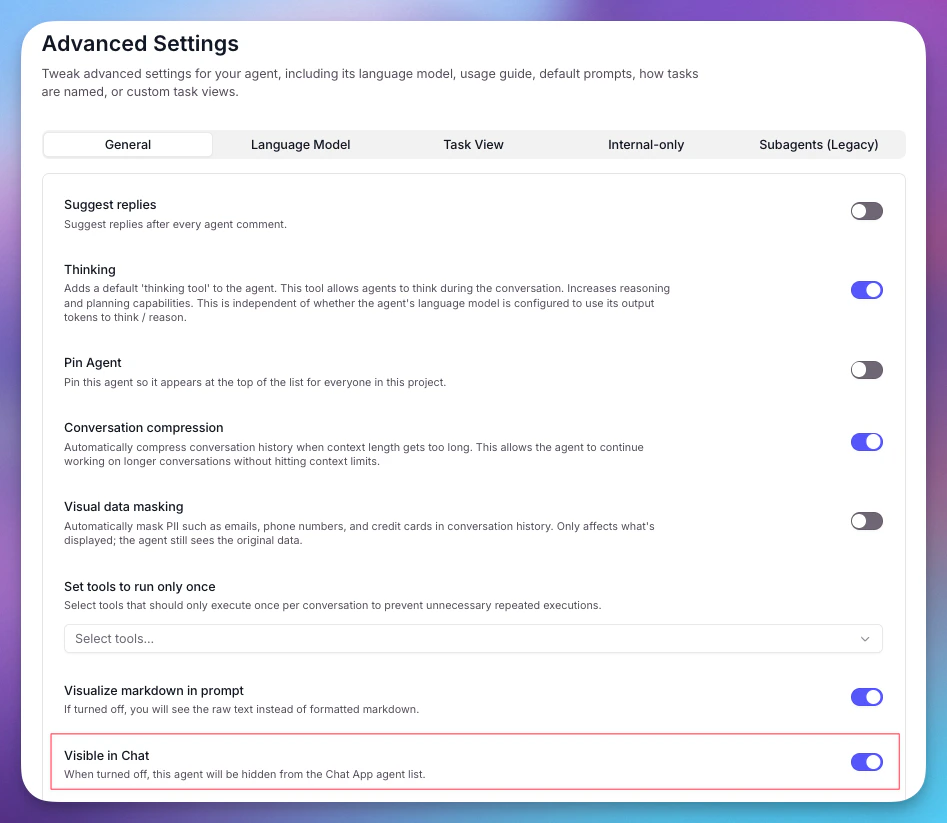
- Open the Agent in the builder
- Go to Advanced Settings > General
- Toggle Visible in Chat on or off
Hiding an Agent from Chat does not disable it. Hidden agents remain fully accessible in the builder’s app, via API, and direct links.